It is 9pm and you are doing the mental sweep. Did the school email need a reply. Did the invoice go out. What was the thing you told yourself you would not forget this morning.
I do not do that sweep anymore. I built a dashboard that holds my whole life, both businesses, both girls, the money, the week. And the notification system for it is a small cartoon cat named Panko who lives on my desktop. When she is asleep, nothing needs me. When she is awake and waving, something does.
This guide is everything I know about it. Start with the two-hour version: a dashboard that works today, and the habit that makes it stick. When you want more, the full system is right below it: the brain, the sweeps, the safety rules, the buttons, and the cat. No code. I did not write a single line of it.
1. Your first two hours
You do not need to learn all of Claude. You need two hours, and they do two different jobs.
Hour one: build the dashboard. Connect your apps, create an artifact, and describe what you want to see every day.
Hour two: build the habit. Take the first three things on your to-do list and try to do them through Claude.
Check three things before you start:
- Your plan. Connecting apps to an artifact takes Pro, Max, Ultra, Team, or Enterprise. The Free plan does not include it.
- Where you build. Use Claude on the web or the desktop app. That is where artifacts connect to your apps.
- One setting. In Settings, under Capabilities, turn on Create and edit files. On Team and Enterprise, this one lives in your organization's settings, so you may need your owner.
2. Hour one: connect your apps
Go to Customize, then Connectors, and click the plus button. Pick an app, click Connect, and sign in. Do your email and your calendar first. Then add whatever else tells you how your life is going, like any analytics apps you check.
Claude only sees what your own account can see. The first time your dashboard needs an app, Claude shows you which apps and tools it wants to use and asks you to approve them. You can turn individual tools off.
3. Hour one: create the artifact and talk to it
Find Artifacts in the left navigation and create a new one. The Dashboards template is the closest starting point. It is in beta, so what you see may shift a little.
Then click the microphone and start explaining what you want. Talk instead of type. You will say more, and more is what makes it good. Ramble like you are briefing a new assistant on day one.
Most people want to see their calendar, any conflicts, all their emails, and draft responses to those emails. If you would rather read something, say this:
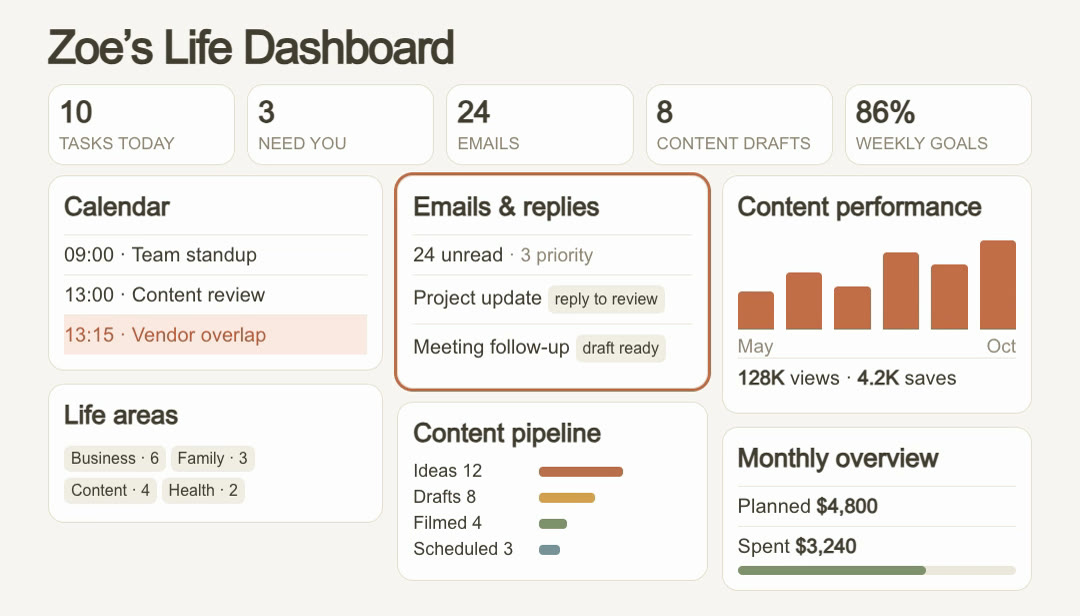
The first version will be wrong somewhere. Good. Keep talking to it in the same chat: move this, cut that, make the conflicts red. If a chart looks off, open its query to see exactly what it is counting, and check when its data was last refreshed.
Your dashboard starts private to you. If you share it, each person connects their own apps. Sharing the page does not hand over your inbox.
4. What to put on it
Start with what you check every day anyway, then add one panel at a time.
- The numbers up top: tasks today, what needs you, unread email.
- Calendar: today's schedule, with overlaps flagged.
- Emails and replies: what is a priority, and which replies are drafted.
- Life areas: how many open things sit under business, family, health, or whatever your areas are.
- Your work: a pipeline, a performance chart, whatever you are always tabbing over to check.
- Money: what you planned to spend this month and what you have spent.
- Goals: how far along the week is.
The test for every panel: would you look at it tomorrow morning? If not, cut it.
5. Hour two: do your to-do list through Claude
Now go to your to-do list. Look at the first three items. Whatever they are, you are going to try to do them through Claude.
Do not pick the easy ones. This is just practice. You are building the muscle that, instead of doing something manually, you go to Claude.
6. When it breaks, keep pushing
Test it. See if it breaks. Keep pushing until you are actually able to do that task in Claude. Most of the time you can. It just takes some figuring out.
Three things to say when it stalls:
One limit worth knowing: connected tools that need your approval for each action are not available inside an artifact. If your dashboard cannot do something, try the same task in a regular chat.
7. Then build the full system: what you are actually building
The dashboard above is a page you open. The full version runs without you. It sweeps your life on a schedule, drafts what it can, and tells you when something needs you. This part uses Claude Code.
Three pieces, and they are simpler than they sound.
A brain. One file that holds every task in your life. Each task knows where it came from, an email, a Slack message, a calendar invite, and when it is due.
A dashboard. One page that shows the brain at a glance: what needs you, what got handled for you, what is drafted and waiting for your approval, and today's schedule with conflicts already flagged.
A face. Mine is a Bengal cat because my real cat is a Bengal. The pet sits on your desktop and has exactly two moods. Asleep: you are clear. Awake: something needs you. That is the whole interface, and it is the reason I actually look at it.
8. One glance, whole life
The dashboard answers one question: what actually needs me right now. Mine shows three numbers at the top. Needs you. Handled for you. Drafts waiting.
Below that, today's schedule. This is where it earns its keep. When two meetings land back to back with zero gap, it flags the conflict and suggests the fix before I hit it in real life. When the team meeting moves and wipes everyone's RSVP, that shows up as a task, not a surprise.
The last strip is my favorite. "Done before you woke up." Invoice reminders drafted. A form filled out. The grocery list built. I am a 5am person and the system runs before I do.
9. One brain, three sweeps a day
The magic is not intelligence. It is consistency. Three times a day, Claude sweeps every connected source, email, calendar, Slack, my business tools, and files anything new into the one task file. Every task gets a source, a priority, and a due date.
You are not building a fancy app here. You are building a habit that a very patient assistant keeps for you, on a schedule, forever.
If you want the daily rhythm without the pet, start with putting Claude on a schedule. This system is that idea, grown up.
10. It predicts what you need
Here is the difference between a to-do list and a chief of staff. A list tells you the email came in. This drafts the reply.
It sees the school event in the newsletter and adds it to the calendar. It sees the invoice going overdue and writes the reminder in my tone. It sees Friday's field trip and tells me Thursday night what to pack. I did not ask for any of those. They were waiting for me.
And when I do want something, I just talk to it. "What does today look like" gets a real answer, because it is reading my real life, not a chat window with amnesia.
That briefing habit alone is worth the build. I wrote about the simple version in the morning briefing routine.
11. The rules that make it safe
This is the section people skip and should not. My system runs under two hard rules, and they are why I trust it.
It drafts everything. It sends nothing. Every email, every reply, every reminder sits in a drafts queue until I approve it. I am not paranoid. I am a tech exec. The approval step costs me minutes a day and means a mistake costs me nothing.
It never deletes. Tasks get marked done, not erased. If it ever gets something wrong, the record is still there.
12. Build it in an afternoon
You need Claude Code, your accounts connected, and one honest paragraph about your life. Here is the prompt. Edit the assistant and the specifics to yours: a cat, a glowing orb, a little robot, whatever you will actually look at.
Mine took one afternoon, and most of that was me being picky about the cat's ears. Start ugly. The system working matters more than the pet being cute on day one.
13. Make it yours
Your assistant can be anything you can describe. A pet, a glowing orb, a little robot, a houseplant that wilts when you have unread permission slips. The point is a state you can read across the room.
Then give it your real life. Mine knows Olive's school sends everything by email and Luna's sends nothing at all. It knows which clients get a gentle nudge and which get a firm one. That context is what turns a script into a chief of staff, and it is the same move I use everywhere: run the home like you run the company.
14. Give it tabs for the parts of your life
One list works until your life has departments. Mine does: two businesses, two girls, money, content. The fix is tabs, so every task lives in exactly one place and each part of your life gets its own front door.
Name the tabs after your actual life, not categories from an app. If you run one business and a book club, those are your tabs. The Today tab is the one rule I would keep no matter what: one place that answers "what actually needs me right now."
15. Let it draft in your voice, not a voice
The dashboard gets ten times more useful the day the drafts stop needing rewrites. That happens when it drafts by audience, because you do not write to a client the way you write to the school.
16. Add buttons that do things
Here is how I think about buttons: a button is any sentence you say to Claude twice a week. If you keep typing "chase the unpaid invoices" or "what should I say to this person," stop typing it. Pin it to the dashboard and make it one click.
The Draft bid button is mine because I price cleaning contracts every week, and it went from twenty minutes to one click and a review. Yours might be "draft the estimate," "prep the lesson," or "answer the listing inquiry." Same shape: pull the request, check your own files for the numbers, draft the response, wait for your yes.
More buttons worth stealing, one line each:
- Clear my morning: draft replies to everything that arrived overnight, priority order.
- Chase invoices: find what is unpaid past due, draft the nudges, gentle or firm by client.
- Prep tomorrow: tomorrow's schedule, conflicts, what to wear, and what I promised people today.
- Plan dinner: look at this week's calendar and draft the meal plan around the busy nights.
- Weekly review: what got done, what slipped, what to drop entirely.
And the test for every new idea stays simple. If it needs information, that is a context file. If it needs to act, that is a connector. If you ask for it twice a week, that is a button.
What to notice across all of it:
- Two hours is enough to start. The first hour builds the page. The second builds the habit of going to Claude first.
- The dashboard is the product, the pet is the doorway. Fun is a feature, it is what makes you actually look.
- Sweeps on a schedule beat intelligence. Consistency is the whole trick.
- Drafts, never sends. You stay the editor of your own life.
- One file, one glance. If it takes more than a look to know if you are clear, it is not done yet.
- A button is a sentence you say twice a week. If you keep typing it, pin it to the dashboard.
It is not magic. It is me handing off the parts of my life I was bad at, to something that never forgets and never sends without asking.
Start hour one today. When the dashboard sticks, build the brain and the sweeps, even without the pet. Once you feel a morning where nothing was forgotten overnight, you will want the cat. Everyone wants the cat.