You type a prompt into a video model. You wait. You get one video, and you have already paid for it. The fox's ear is wrong, so you pay again and hope.
There is another way now. You can ask Claude to write the whole film as code. Every frame, the fox, the clouds, even the music. No image generator, no video generator, no footage.
This is everything I learned making them: the exact prompts, how to edit one thing without touching the rest, how to get a real video file you can post, and what goes wrong.
1. What this actually is
A video model hands you pixels. You cannot open them up and fix the ear. All you can do is ask again.
A Claude video is a program. It is usually one HTML file that draws each frame and plays its own music. Open it in a browser and it plays. Because it is code, you can see how it is made, change any part of it, and build on it. It is way less of a black box.
2. Start with one prompt
This is the prompt I used for the fox. Copy it, then swap in your own idea.
Download the file and open it in your browser. The first version will not be your favorite. That is normal. The first draft is the starting point, and the follow-ups are where it gets good.
3. Ask for dials before you ask for changes
This is the follow-up that changes everything. Ask Claude to put the things you might want to change in one place at the top of the file.
Now the fox's coat, the ear shape, and the speed of each bird are all just lines you can read. You do not have to know how to code to change "pointed" to something else, or to ask Claude to do it for you.
4. Change one thing at a time
This is where it beats a video model. I changed just the ear. Then just the sky. Then I slowed down one bird. Everything else stayed exactly the same, because nothing else was touched.

Save every version as its own file. Then you can always go back, and you can show someone exactly what changed.
5. Go big: scenes that stop the scroll
A cartoon fox is the simple version. You can also ask for scenes that look far more detailed, still with no images. The trick is to name the technique, because it tells Claude to build light and depth instead of flat shapes.
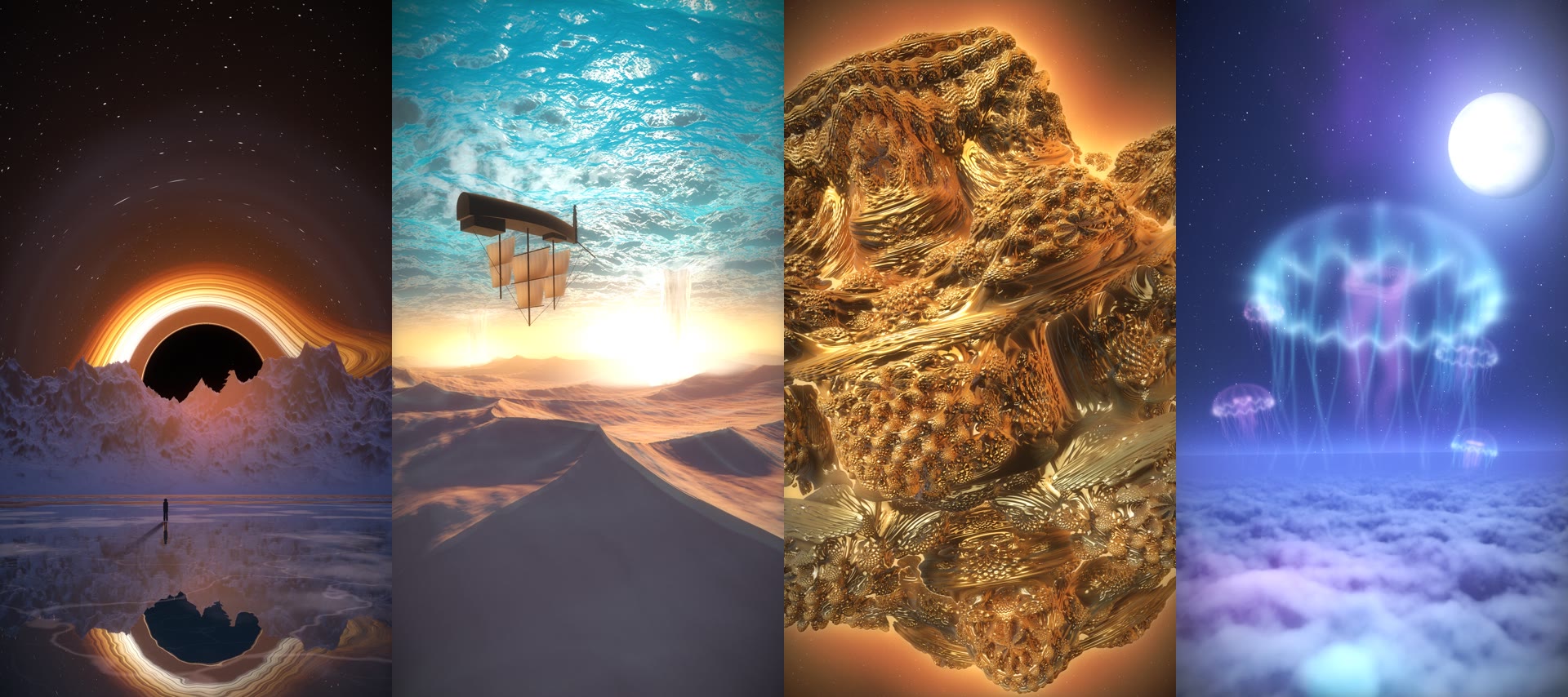
The ideas that worked best were impossible things you can picture in one sentence: an ocean hanging upside down over a desert, a gold shape grown from one equation, jellyfish the size of storm clouds. One slow camera move does more than a lot of action.
Keep your expectations honest here. This style is great for abstract and surreal worlds. It will not give you a realistic person or a real place. If you need that, a video model is still the right tool.
6. Make Claude look at its own work
This is the biggest learning. Writing the code is the easy part. The first versions of my scenes were blown out, crude, or had holes in them, and the code still ran fine. Nothing errors when a mountain looks wrong.
So tell it to check. If you use Claude Code, it can pull frames from the film and look at them.
These are the problems that came up again and again, so you can name them up front:
- Too bright. Glowing scenes blow out to white. Ask it to lower the exposure and keep detail in the highlights.
- Things that read wrong. My first waterfalls looked like vases, and my first moon was shaped like an egg. Say what it looks like, and it can fix it.
- Tiles and repeating patterns. Ask it to warp the texture so it stops looking like a grid.
- Gaps in the distance. Far-off objects can break up. Ask it to add more detail steps for faraway things.
7. Turn it into a video you can post
An HTML file plays in a browser, but Instagram wants an MP4. Screen recording works in a pinch. The better way is to have Claude Code record the film frame by frame, so nothing stutters even if your computer is slow.
That first sentence matters. When each frame comes from a time value, you can jump to any moment, and every export matches.
Because it is code, the shape is just another setting. I made horizontal and half-screen versions without starting over.
8. Check the music yourself
Claude can write music, and it can measure how loud that music is, but it cannot hear it. Play every version with sound before you post. Mine also came out at very different volumes from one scene to the next, so if you are cutting several together, ask it to match them.
What to notice
- It is editable. That is the whole difference. You can fix the ear without paying for a new fox.
- Dials first. One settings block at the top makes every later change small and safe.
- One change at a time, new file each time. You always have a way back.
- Name the technique. "WebGL shaders and raymarching" is what moves it from flat to high fidelity.
- Working code is not the same as a good film. Have it look at its frames, and use your own ears for the music.
- Pick impossible, not realistic. Use a video model when you need a real person or place.
A video model gives you an answer. This gives you the instructions, and you can change them.
Start with the fox prompt, then ask for the dials and change just one thing. If you want to edit videos of yourself, not make films from scratch, that is the free editing guide.